
Partner with a top Web Design company in Bangalore
Build a Website That Brings Leads, Trust, and Growth
In today’s digital-first world, your website is often the first salesperson, first impression, and first trust signal for your business. For small and medium businesses in Bangalore and across India, a poorly designed website can silently cost you leads, credibility, and revenue.
That’s why partnering with a reliable web design company in Bangalore isn’t just a design decision – it’s a business growth decision.
We’ll walk you through what modern web design really means, how it connects with growth, and how the right web partner can support DevOps and cloud-driven scalability.
Why Your Website Matters More Than Ever in 2026
Most Indian SMEs already have a website.
Very few have a website that works for the business.
Common problems we see:
- Websites that look good but don’t generate enquiries
- Slow-loading pages that lose visitors
- Poor mobile experience
- No integration with CRM, APIs, or internal systems
- Websites that break during traffic spikes or campaigns
A modern website is no longer a “digital brochure.”
It’s a growth platform that connects marketing, sales, operations, and technology.
What Does a Web Design Company in Bangalore Actually Do?
A professional Web Design company in Bangalore goes far beyond colors and layouts.
Core Responsibilities
- Understanding your business goals
- Designing user-friendly interfaces
- Developing fast, secure, scalable websites
- Integrating APIs, databases, and CMS platforms
- Preparing your site for SEO, DevOps, and cloud scalability
This is where web design and development merge into one strategic function.
If you’re curious how modern websites rely on APIs and backend systems, this guide explains it well: How API Integration Works: Simplified for Beginners
Web Design vs Web Development
Many business owners confuse the two.
Web Design
- Layout and structure
- User experience (UX)
- Mobile responsiveness
- Branding and visuals
Web Development
- Coding and logic
- Database connections
- CMS setup
- Performance, security, and scalability
A strong web development company in Bangalore handles both together – because separating them causes delays, rework, and higher costs.
Why Indian Businesses Prefer Bangalore-Based Web Partners
Bangalore isn’t just a tech city – it’s an execution hub.
Local Advantages
- Access to experienced engineers and designers
- Strong exposure to global standards
- Cost-effective without compromising quality
- Easy collaboration for Indian businesses
- Deep understanding of Indian buyer behavior
This is why many companies looking for a web design company in India specifically shortlist Bangalore firms.
Benefits of Professional Web Design for SMEs in India
A well-built website delivers real business value:
1. Higher Lead Conversion
Clear messaging, fast load times, and structured pages turn visitors into enquiries.
2. SEO-Ready Foundation
Good design supports content, internal linking, and technical SEO from day one.
For example, structured CMS and content strategies are explained here: What Is a Content Management System? A Beginner’s Guide by MNSP – An IT Software Company in Bangalore
3. Mobile-First Experience
Over 70% of Indian traffic is mobile. Design must start there.
4. Scalable for Growth
Your site should not break when traffic grows or when new features are added.
Our Web Design and Development Services
As a full-service web design and development partner, our approach is business-first.
What We Build
- Corporate websites
- Startup MVP websites
- CMS-driven marketing sites
- E-commerce platforms
- Custom web applications
- API-powered portals
For e-commerce-focused businesses, this guide is worth reading: 10 Must-Have Features of a Successful E-Commerce Website in 2025
Our Website Development Process
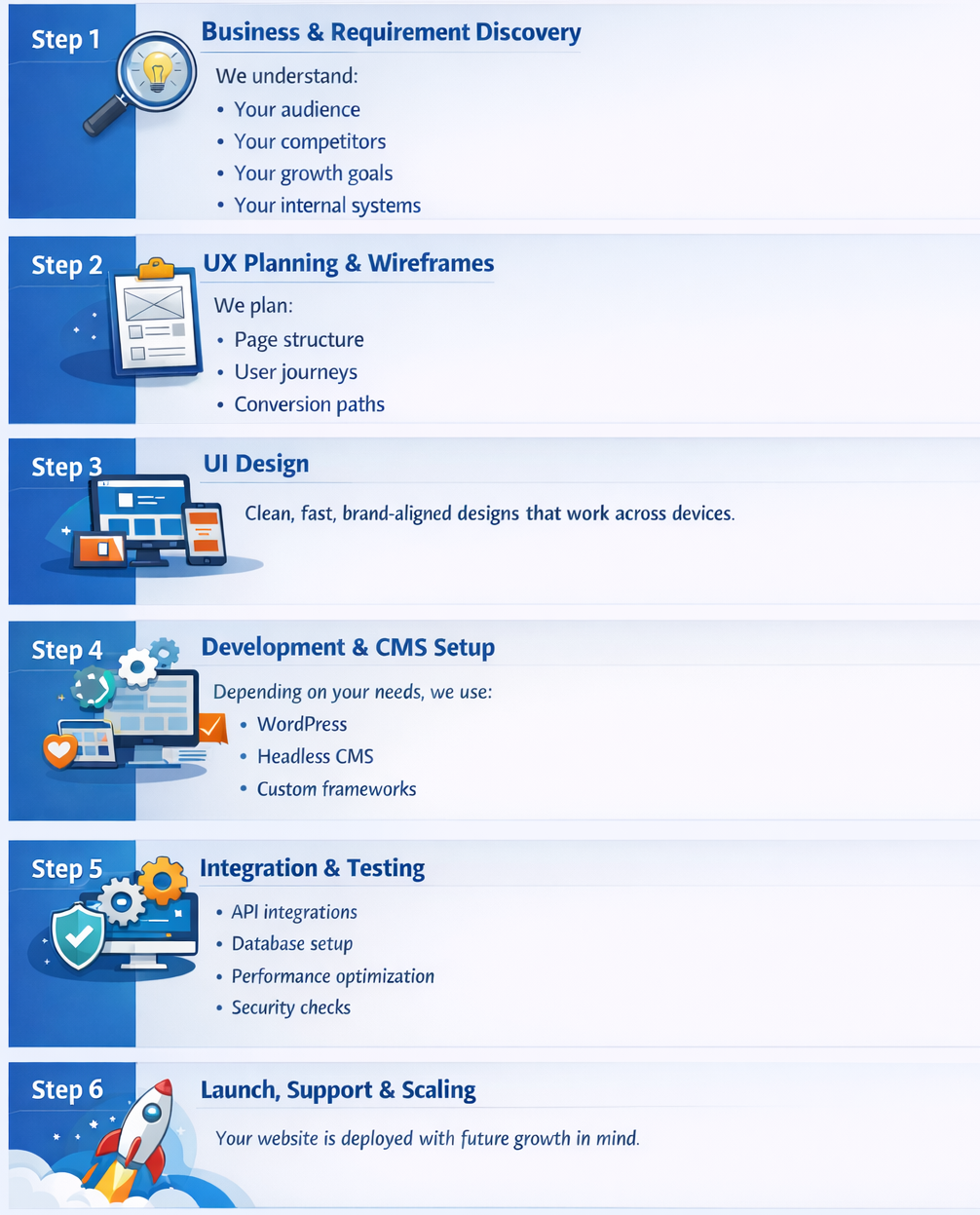
Step 1: Business & Requirement Discovery
We understand:
- Your audience
- Your competitors
- Your growth goals
Your internal systems
Step 2: UX Planning & Wireframes
We plan:
- Page structure
- User journeys
- Conversion paths
Step 3: UI Design
Clean, fast, brand-aligned designs that work across devices.
Step 4: Development & CMS Setup
Depending on your needs, we use:
- WordPress
- Headless CMS
- Custom frameworks
Learn why headless CMS is becoming popular: Why Headless CMS is Changing the Content Management Landscape
Step 5: Integration & Testing
- API integrations
- Database setup
- Performance optimization
- Security checks
Database fundamentals explained here: Database Design How To: Best Practices for Beginners
Step 6: Launch, Support & Scaling
Your website is deployed with future growth in mind.
Tools & Technologies We Use
We choose tools based on business needs, not trends.
Frontend
- HTML, CSS, JavaScript
- React (when required)
- Bootstrap
Backend
- PHP / Node.js / Python / Go
- Secure API layers
CMS & Content
- WordPress
- Headless CMS platforms: Top 10 Headless CMS Open Source Platforms to Watch in 2026
DevOps & Cloud
- CI/CD pipelines
- Cloud hosting
- Performance monitoring
If your website is part of a larger digital ecosystem, your web partner must understand DevOps and cloud fundamentals, not just design.
Common Mistakes Businesses Make When Choosing a Web Design Company
Avoid these traps:
- Choosing based on price alone
- Ignoring performance and scalability
- No documentation or handover
- No post-launch support
- No understanding of APIs or databases
This article explains why professional development matters: 10 Reasons Your Business Needs Professional Web Design and Development Services
Real-World Use Case Scenarios
Scenario 1: SME Expanding Digitally
A services company moves from offline sales to online lead generation using a CMS-based website with SEO and API integrations.
Scenario 2: Startup Launching an MVP
A startup launches fast using modular design, cloud hosting, and scalable backend architecture.
Scenario 3: IT Consultant Scaling Operations
A consultant builds internal dashboards, databases, and portals.
How MNSP Helps IT Consultants in Bangalore Design High-Performance Databases
Bangalore Market Insights: What Works Locally
- Clear pricing pages
- Trust signals (certifications, testimonials)
- Fast-loading mobile pages
- Local SEO optimization
- WhatsApp and call integrations
Future-ready websites must also adapt to evolving expectations: What Makes a Great Website in 2026? 10 Must-Have Features for Success
FAQs
- How long does it take to build a business website?
Typically 4–8 weeks depending on complexity.
- Do I need technical knowledge?
No. We explain everything in simple terms.
- Can the website scale later?
Yes – if designed correctly from day one.
- Is SEO included?
Technical SEO is. Advanced SEO would be an additional service.
- Do you offer ongoing support?
Yes – support, updates, and performance monitoring.
Why Partner with Us
- Business-first approach
- Strong web + backend + DevOps understanding
- Clear communication for non-technical clients
- Scalable, secure, and future-ready builds
- Long-term technology partnership mindset
Our process maturity and quality standards are inspired by structured frameworks like CMMI: MNSP’s Approach to Product Building: Implementing CMMI for High-Quality Development
Ready to Work with a Trusted Web Design Company in Bangalore?
If you’re looking for a Web Design company in Bangalore that understands business growth – not just design – let’s talk.
We help Indian SMEs build websites that:
- Generate leads
- Build trust
- Scale with DevOps and cloud
- Support long-term digital transformation
“Great web design sits at the intersection of business clarity, user trust, and scalable technology.”
